
Planet Zoo 2 has three main modes: Career, Franchise and Sandbox. In Planet Zoo 2 Franchise mode, you build a connected network of zoos and Wildlife Reserves, trade Habitat Animals with other players and share Conservation Credits between your zoos, while Cash stays local. You must be online to play Franchise.
Which Planet Zoo 2 game mode should you choose?
Choose Career for scenario objectives, Franchise for an online conservation network, or Sandbox for adjustable animal and economy settings.
Career: recommended for a guided start
You join FEN, the Fauna and Ecosystems Network, and complete conservation scenarios. Objectives award Bronze, Silver and Gold medals, which also raise your Accreditation Tier in Career. Choose this if you want goals to work toward before planning your own network.
To begin, select Career → Start New Career +, read Eric Ashford's welcome letter, then choose the first location in Chapter 1 and select Travel to Wildlife Reserve. Your campaign starts at a reserve rather than a blank zoo plot.
Franchise: recommended for linked zoos and player trading
You create your own international network, trade Habitat Animals through Animal Trading and participate in Community Challenges. This is the choice for building several zoos that support a wider conservation project. Plan each zoo's finances separately: shared credits do not give a struggling zoo access to another zoo's Cash.
Sandbox: recommended for building on your terms
You can create a zoo or Wildlife Reserve and change the level of simulation through animal and economy settings. For a zoo, choose a biome, continent and name, then a Default, Creative or Challenge preset and Flat or Sculpted terrain. Open Sandbox Settings to adjust Economy and Animal Welfare before selecting Create Zoo.
Challenge is a Sandbox preset here. For a Wildlife Reserve, the listed presets are Default and Creative, and you can choose whether its ecosystems are already established. Pick Sandbox when those settings matter more to you than Franchise's connected player economy.
How does Planet Zoo 2 Franchise mode work?
Franchise links your zoos and Wildlife Reserves, but only Conservation Credits are shared between its zoos; Cash is not.
| Franchise feature | What it means for your plan |
|---|---|
| Online play required | Be online when you play this mode. |
| Shared Conservation Credits | Treat credits as a resource across your Franchise's zoos. |
| Separate Cash balances | Keep each zoo's income and running costs sustainable. |
| Habitat Animal trading | Trade these animals with other players through Animal Trading. |
| Community Challenges | Take part after creating your Franchise zoo. |
The safer start is a zoo you can keep running before expanding. New animals, staff and facilities cost Cash, and salaries and energy bills keep coming. Another zoo's cash balance cannot cover those costs for you. For help deciding what to build first, continue with Planet Zoo 2 tips.
- Select Franchise and sign in to your Frontier account, or register one.
- Select Start New Franchise + and confirm your Franchise name, banner colour and sticker.
- Choose your zoo's biome and continent, then name the zoo.
- To add another zoo later, open the Planet Hub through the world icon and select Create New Zoo. Choose its biome, continent and name, then select Create Zoo.
After creating another zoo, it appears alongside your working zoos in the Planet Hub. Think about the setting before you commit; Planet Zoo 2 biomes covers that next decision.
How do you unlock more animals in Franchise mode?
Raise your Accreditation Tier by developing zoos with high Zoo Reputation and Wildlife Reserves with high Biodiversity Rating.
Higher tiers unlock species in Trading, improved Marketing, new Research Network types and more animal storage. You start at Tier 1, and a zoo with a three-star reputation unlocks Tier 2.
Tier 5, where elephants and giant pandas unlock, needs at least two well-running zoos. Select Tier 5 - Locked in the Accreditation panel and you see a Requirements area with separate counters, such as 0/3 and 0/2, next to the Species unlock list. Check each requirement's details before you plan, because two zoos alone is not the whole checklist.
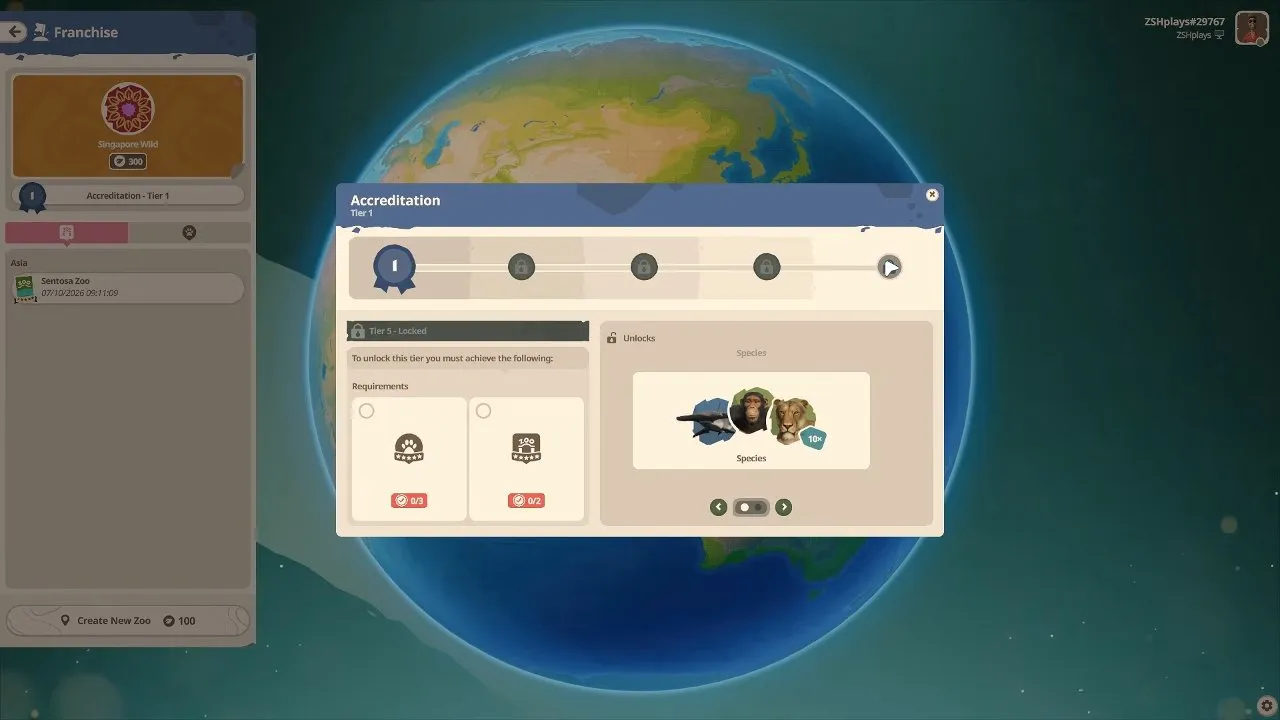
The panel may look like a simple animal-unlock ladder at first. Read it as a network progression checklist: select the tier, inspect every requirement, then decide whether your next improvement belongs in a zoo or a reserve. For the conservation side of that plan, see Planet Zoo 2 wildlife reserve.
How does Planet Zoo 2 Zookeeper Mode work?
Planet Zoo 2 has no separate Zookeeper Mode with hands-on feeding or cleaning; the closest option is visiting zoos on foot.
You can explore Sandbox, Franchise and other players' zoos from a first-person guest perspective. That lets you walk your zoo at ground level. Explore mode is a camera that moves slowly at a fixed height above the terrain.
For animal care in your managed zoo, you hire Keepers to feed and care for animals and Caretakers to keep the zoo clean. Choose your main mode around the management and building features above.
With your mode chosen, you have a clear route: scenario medals in Career, a linked conservation network in Franchise, or customised settings in Sandbox. Once you are ready to populate your first zoo, check Planet Zoo 2 animals before planning habitats around your roster.